
Our Collections



Keyboards
-
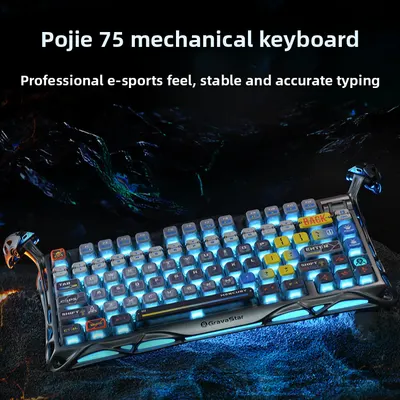
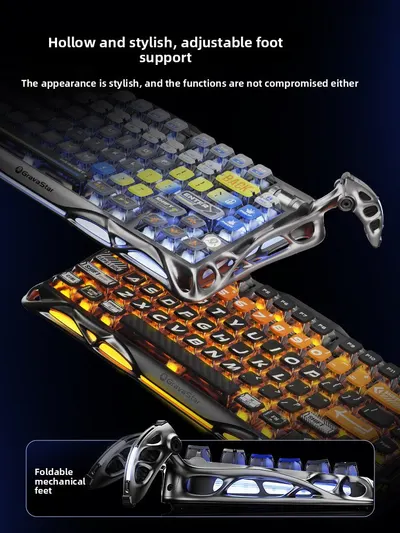
Gravity Planet Wireless Mechanical Keyboard with RGB Backlighting
Regular price From $256.09Regular priceSale priceFrom $256.09 -

 Sale
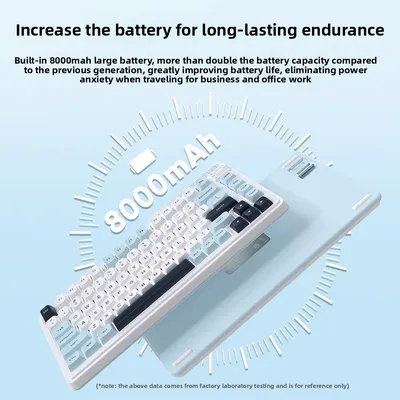
SaleTriple Mode Mechanical Keyboard, Hot-Swappable Gasket Mount for Typing
Regular price From $78.03Regular priceSale priceFrom $78.03 -
 Sale
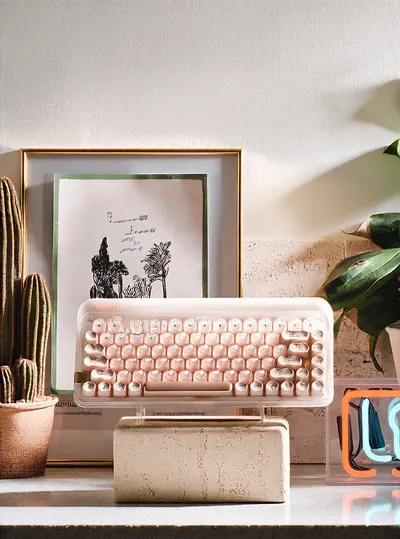
SaleBluetooth Mechanical Keyboard 84 Keys Wireless Compact for Office
Regular price From $375.69Regular priceSale priceFrom $375.69
No products match these filters. Remove all
Keyboards at Global Swanky cover typing, gaming and travel: compact 68-key mechanical boards with RGB backlighting, 108-key hot-swappable three-mode wireless models, magnetic switch gaming boards, gasket-mount custom builds, foldable Bluetooth options for phones and tablets, punk retro designs with round keycaps, silent ergonomic sets, PBT keycap sets and wrist rests. Prices start at $20.64.
Key Takeaways
- Our keyboards range includes 279 products, starting from $20.64 as of October 15, 2026.
- By title, about 141 are wireless or Bluetooth, 135 are mechanical, 94 are gaming or RGB, 32 are hot-swappable and 24 are keycap sets.
- The median starting price is $46.81, and 179 products start under $60.
- OSHA recommends keeping your wrists straight and in line with your forearms, with shoulders relaxed and elbows close to your body.
- Check switch type, layout and connection before you buy.
On this page
- Why Upgrade Your Keyboard?
- Using Keyboards Comfortably
- What's in Our Keyboards Collection?
- Keyboards Switch Guide
- Types of Keyboards
- Keyboards by Use
- How to Choose Keyboards
- Caring for Keyboards
- Shipping, Returns and Support
- Keyboards FAQs
- Find the Right Keyboards
Why Upgrade Your Keyboard?
You touch your keyboard thousands of times a day, so the right one makes a real difference. Mechanical switches give crisp, consistent feedback, wireless connections clear your desk, compact layouts free up mouse space, and foldable models turn a phone or tablet into a mini workstation. Customizable keycaps and lighting let you make your setup your own.
Better typing feel
Mechanical switches offer satisfying, consistent keystrokes.
Cleaner desk
Wireless and compact boards save space.
Personal style
Swap keycaps and set RGB effects.
Using Keyboards Comfortably
OSHA advises keeping your shoulders relaxed, elbows close to your body and wrists straight and in line with your forearms. It explains that keyboard tilt may need adjusting to keep wrists neutral, and that keyboard feet shouldn't be used if they increase wrist bending.
Use a wrist rest
Rest palms lightly during pauses, not while typing.
Keep the mouse close
Compact layouts leave room for your mouse nearby.
What's in Our Keyboards Collection?
The range includes 279 products as of October 15, 2026.
| Keyboard | Example and price (USD) |
|---|---|
| Wrist rests | TPE Keyboard Wrist Rest, Breathable Support ($25.58) |
| Keycap sets | High-Profile PBT Keycaps for Mechanical Boards ($32.73) |
| Ergonomic sets | Wireless Keyboard Set with Silent Keys ($33.53) |
| Numeric keypads | Bluetooth Mini Numeric Keypad, Multi-Device ($39.12) |
| Compact mechanical | 68-Key Triple-Mode RGB Mechanical Keyboard ($44.56) |
| Foldable models | Foldable Bluetooth Keyboard for Phones, Tablets and Laptops ($49.09) |
| Retro designs | T75 Punk Retro Mechanical Keyboard with Round Keycaps ($52.72) |
| Magnetic switch boards | Magnetic Switch Mechanical Keyboard with RGB ($74.00) |
| Gasket-mount boards | Custom Gasket Hot-Swappable RGB Mechanical Keyboard ($79.57) |
| Full-size wireless | 108-Key Hot-Swappable Three-Mode Wireless Keyboard ($88.39) |
Counts above come from product titles. For mice and mouse pads, browse our tablets and computer accessories collection.
Keyboards Switch Guide
| Switch | Feel | Best for |
|---|---|---|
| Linear | Smooth, no bump | Gaming |
| Tactile | Gentle bump | Typing |
| Clicky | Bump with click sound | Typists who like feedback |
| Magnetic (Hall effect) | Adjustable actuation | Competitive gaming |
| Membrane | Soft, quiet | Shared offices |
Types of Keyboards
Mechanical models
Individual switches for durable, precise keystrokes.
Wireless and tri-mode models
Bluetooth, 2.4GHz and wired in one.
Compact layouts
60%, 65% and 75% layouts save desk space.
Foldable and travel models
Pocket-friendly options for phones and tablets.
Ergonomic designs
Designs that support more natural hand positions.
Keycaps and accessories
PBT keycaps and wrist rests to customize your setup.
Keyboards by Use
| Use | Good choice | Why |
|---|---|---|
| Gaming | Magnetic or linear mechanical | Fast response |
| Office | Silent ergonomic set | Quiet and comfortable |
| Travel | Foldable Bluetooth keyboard | Pocket-sized |
| Small desk | 68-key compact | More mouse room |
| Customizers | Hot-swappable gasket board | Change switches easily |
| Data entry | Numeric keypad | Fast number input |
How to Choose Keyboards
- Pick a layout: full-size, TKL or compact.
- Choose switches for typing or gaming.
- Decide on wired, Bluetooth or tri-mode.
- Check OS compatibility (Windows, Mac, iPad, Android).
- Look for hot-swap sockets to change switches.
- Check keycap material: PBT lasts longer than ABS.
Caring for Keyboards
- Shake out crumbs and use a soft brush.
- Remove keycaps occasionally for deep cleaning.
- Wipe surfaces with a slightly damp cloth.
- Keep drinks away from your keyboard.
- Charge wireless boards with the supplied cable.
Shipping, Returns and Support
We ship computer accessories to US addresses only, and standard shipping is free. Most orders arrive within 6 to 32 business days, and you can track your order once it ships.
Returns are accepted within 30 days of delivery if the item is new, unused and in its original packaging, with no restocking fee. Read the full terms in our return policy, and contact our support team if your order arrives damaged.
Keyboards FAQs
Mechanical or membrane?
Mechanical boards use individual switches under each key for crisp, consistent feedback and long life. Membrane models use a rubber layer, so they feel softer and are usually quieter and lighter. Choose mechanical for typing feel and gaming, and membrane for quiet shared spaces.
What does hot-swappable mean?
A hot-swappable board lets you pull out and replace switches without soldering, so you can try different switch types or fix a single key easily. Check that new switches match the socket type, usually 3-pin or 5-pin.
What's a 60% keyboard?
A 60% keyboard removes the number pad, function row and arrow cluster, using layers to access those keys. 65% and 75% layouts add back arrows or function keys while staying compact.
Do these keyboards work with Mac?
Many boards work with Windows, Mac, iPad and Android, and some include a Mac mode or swappable keycaps. Check each listing for operating system compatibility.
What is tri-mode?
Tri-mode models connect three ways: Bluetooth for laptops and tablets, a 2.4GHz USB receiver for low-latency wireless and a USB-C cable for wired use and charging.
Are PBT keycaps better?
PBT plastic is harder and more resistant to shine and wear than ABS, so keycaps keep their texture longer. ABS keycaps are lighter and often brighter in color.
Are mechanical keyboards loud?
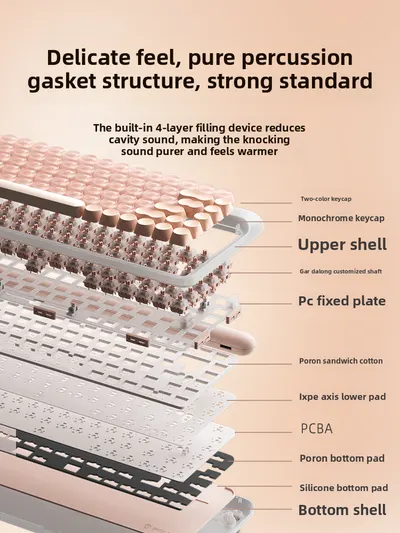
Volume depends on the switch. Clicky switches are loud, tactile switches are moderate and linear or silent switches are quieter. Gasket-mount and foam-filled boards also sound softer.
How do I clean a keyboard?
Unplug or turn it off, turn it upside down to remove crumbs, brush between keys and wipe with a slightly damp cloth. On mechanical boards, remove keycaps with a keycap puller for deeper cleaning.
What are magnetic switches?
Magnetic (Hall effect) switches detect key position with magnets, so you can adjust how far a key travels before it registers, which many gamers like.
Do I need a wrist rest?
A wrist rest can help you rest your palms during pauses and keep wrists in a neutral position, especially with taller mechanical keyboards.
How long does shipping take?
Most orders arrive within 6 to 32 business days of being placed. That covers 1 to 2 business days of handling and 5 to 30 business days in transit. Standard shipping is free on every order, and we currently ship to US addresses only.
Can I return keyboards?
Yes, within 30 days of delivery, if the item is new, unused and in its original packaging. Email support@globalswanky.com with your order number, the product name and the reason for the return, then wait for return instructions. There's no restocking fee.
Find the Right Keyboards
Choosing keyboards comes down to three checks: layout, switch feel and connection. A compact 68-key mechanical keyboard or a foldable Bluetooth keyboard makes an easy start.
Ready to choose? Scroll up to the product grid, or browse our GPS smartwatches and security cameras collections.
- Choosing a selection results in a full page refresh.
- Opens in a new window.

Global Swanky
1 × $0.00 · Free US shipping
$0.00
- 1 Payment
- 2 Shipping
- 3 Done
Checkout is temporarily unavailable.
Please try again in a moment, or email support@globalswanky.com and we will help you order.
Secured by Stripe. Card details go straight to Stripe, never to our servers.
Order confirmed
Thank you. A confirmation is on its way to .
- Order number
- Total paid
- Paid with
- Delivery
- Dispatched within 24 hours, 3–7 business days