
Our Collections










Computer Components
-
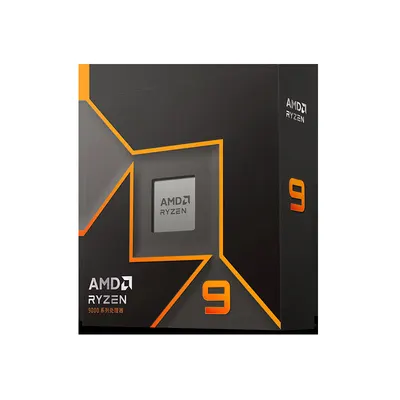
AMD Ryzen 9 9900X 12-Core 24-Thread CPU for Gaming PC Builds
Regular price $742.00Regular priceSale price$742.00
No products match these filters. Remove all
Computer components at Global Swanky include SSDs, memory cards, drive enclosures, ATX power supplies, USB Wi-Fi adapters, laptop batteries and an AMD Ryzen 9 processor. Prices start at $10.00, and standard US shipping is free.
Key Takeaways
- Our computer components collection lists 61 products, priced from $10.00 to $742.00 as of October 5, 2026.
- Storage leads the range: 16 memory cards, 11 SSDs, 7 drive enclosures and docks, plus card readers and portable drives.
- For desktop builds there are three ATX power supplies (750W, 850W and 1000W) and an AMD Ryzen 9 9900X 12-core CPU.
- The SD Association says speed class symbols such as C10, U3 and V30 show a card's minimum write speed, not its top speed.
- The range doesn't include graphics cards, RAM, motherboards or cases, so pair our parts with those from your chosen platform.
On this page
- What Are Computer Components?
- What's in Our Computer Components Collection?
- SSDs: Faster Storage Upgrades
- Memory Cards and Card Readers
- Drive Enclosures and Docking Stations
- Power Supplies for Desktop Builds
- The AMD Ryzen 9 9900X Processor
- USB Wi-Fi and Network Adapters
- Replacement Laptop Batteries
- Other Items in the Collection
- Building a PC: What You'll Need
- Computer Components Glossary
- How to Choose Computer Components
- Upgrading an Older Computer
- Installing Storage Safely
- Backing Up Your Data
- How Much Do Computer Components Cost?
- Common Mistakes When Buying Computer Components
- Shipping, Returns and Support
- Why Shop Computer Components at Global Swanky?
- Computer Components FAQs
- Find the Right Computer Components for You
What Are Computer Components?
Computer components are the physical parts that make up a computer. They include the processor (CPU), memory (RAM), storage drives, the motherboard, the graphics card (GPU), the power supply (PSU) and the case, plus add-ons such as network adapters.
Wikipedia lists computer hardware, the physical components within a computer, as one meaning of the term. In practice, shoppers use computer components to mean the parts they buy to build, repair or upgrade a desktop or laptop.
Some components sit inside the machine, like SSDs and power supplies. Others plug in from outside, like USB Wi-Fi adapters, card readers and external drive enclosures, but they still add or extend core capabilities.
The main computer components
Here's what each core part does:
- CPU (processor): runs instructions and does the computing work.
- RAM (memory): holds data the CPU is using right now; it's cleared when the power goes off.
- Storage (SSD or HDD): keeps your operating system, programs and files permanently.
- Motherboard: connects every part and provides the slots and ports.
- GPU (graphics card): draws images on screen and speeds up games and video work.
- PSU (power supply): converts wall power into the voltages the parts need.
- Case and cooling: house and cool the parts.
- Network adapters: connect the computer to Wi-Fi or a mobile network.
What's in Our Computer Components Collection?
The collection lists 61 products, and every one showed as available when we updated this page on October 5, 2026. Prices run from $10.00 to $742.00, with a median starting price of $22.00.
Here's how the range breaks down.
| Group | Products | Starting prices (USD) | Examples |
|---|---|---|---|
| Memory cards | 16 | $10.00 to $35.00 | microSD and TF cards from 4GB to 1TB, NM card |
| SSDs | 11 | $15.91 to $52.00 | M.2 NVMe and SATA, 2.5-inch SATA, portable SSD |
| Drive enclosures and docks | 7 | $13.00 to $49.89 | 2.5 and 3.5-inch enclosures, M.2 enclosure, cloning dock |
| USB Wi-Fi and network adapters | 8 | $11.14 to $22.07 | Dual-band and 150 to 600Mbps adapters, 4G LTE card |
| Card readers and flash drive | 5 | $10.00 to $14.00 | USB 3.0, OTG and Type-C readers |
| Laptop batteries | 3 | $31.50 to $35.99 | MacBook, MSI and W56 replacements |
| ATX power supplies | 3 | $78.82 to $143.00 | 750W and 850W Bronze, 1000W Gold |
| Portable hard drives | 2 | $22.00 to $25.00 | Metal and 500GB portable drives |
| Processor | 1 | $742.00 | AMD Ryzen 9 9900X |
| Other | 5 | $22.00 to $88.93 | Capture card, 4G dongle, monitor, headphones, starter kit |
Groups come from product titles and descriptions on October 5, 2026. Storage makes up about two thirds of the range.
SSDs: Faster Storage Upgrades
An SSD is one of the most effective computer components to upgrade. Replacing an old hard drive with an SSD usually makes a computer start up and open programs much faster.
M.2 NVMe SSDs
M.2 NVMe drives plug straight into the motherboard and use the fast PCIe bus. The 512GB M.2 Gen3x4 SSD 2280 with 2400MB/s costs $27.00 for 128GB, $36.00 for 256GB, $58.00 for 512GB and $78.00 for 1TB.
M.2 SATA SSDs
M.2 SATA drives share the M.2 shape but use the slower SATA protocol. The M.2 SSD 2280 256GB with SATA Protocol costs $36.26.
Not every M.2 slot supports both types. Check your laptop or motherboard manual to see whether the slot takes NVMe, SATA or both before you buy.
2.5-inch SATA SSDs
2.5-inch SATA SSDs replace laptop and desktop hard drives in the same bay. Our options include the 2.5 Inch SATA Internal SSD for PC and Laptop ($20.00 to $105.00 by capacity) and the N500S Ultra Light SSD in 60GB to 480GB sizes from $15.91.
Portable SSDs
The Mobile SSD for Smartphones with Fast Direct Storage Expansion costs $49.00 for 120GB up to $132.00 for 1TB. It adds external storage to compatible phones, tablets and laptops.
NVMe vs SATA at a glance
| Type | Connection | Typical use | Example in our range |
|---|---|---|---|
| M.2 NVMe | PCIe lanes on the motherboard | Fastest boot and load times | 512GB M.2 Gen3x4 SSD, listed at 2400MB/s |
| M.2 SATA | SATA through an M.2 slot | Older laptops with SATA-only M.2 slots | M.2 SSD 2280 256GB SATA |
| 2.5-inch SATA | SATA cable or laptop bay | Replacing a hard drive | 2.5 Inch SATA Internal SSD |
| Portable SSD | USB | Carrying files between devices | Mobile SSD for Smartphones |
Speeds shown are the listing's stated maximum; real-world speed depends on your device.
Memory Cards and Card Readers
Memory cards store photos, video and files in phones, cameras, dash cams and drones. With 16 listings, they're the largest group of computer components in our range.
Choosing a card by speed class
The SD Association explains that speed class symbols indicate a card's minimum writing speed, while a speed rating such as "120MB/s" represents its maximum speed (SD Association, Speed Class). For video, the minimum matters most.
The SD Association lists Class 10, U1 and V10 cards for HD to Full HD video recording. It also notes that UHS Speed Class 1 (U1) equals Class 10 at 10 MB/s minimum sustained speed, and that a 4K camera could use a U3 card or a V30 to V90 card.
Its advice for matching cards to devices is simple: choose a card with the same or a higher class symbol than the one your device indicates.
Cards in our range
The Monitoring Memory Card 256GB U3 V30 High Speed for 4K Recording offers A1 cards from $28.80 for 32GB to $74.28 for 256GB, plus a card reader variant at $22.31. The Memory Card TF Micro SD Class 10 U3 High Speed costs $27.13.
For dash cams and security cameras, high-durability cards are designed for continuous recording. The High-Durability TF Card 32G, 64G, 128G for Recorder and Cameras costs $13.00 to $29.00.
Card readers
Card readers move files from cards to a computer or phone. The USB 3.0 Card Reader for Fast SD and MicroSD Data Transfer costs $10.00 to $17.00, and the Multi-Function Card Reader for Apple and Type-C costs $12.00.
Check your card's real capacity
Fake-capacity cards are a known problem across the market: the card reports more space than it really has, and files written past the true limit are lost. Test every new card with a capacity-checking tool before you trust it with important photos or video.
If a card fails a capacity test, stop using it and contact our support team within 14 days of delivery.
Drive Enclosures and Docking Stations
Enclosures turn an internal drive into an external USB drive. They're useful for reusing an old laptop drive, backing up files or checking a drive from another computer.
The USB 3.0 SATA Hard Disk Enclosure for 2.5 Inch Drives costs $14.00, and the USB 3.0 HDD SSD Enclosure for 2.5 and 3.5 Inch Drive Storage costs $25.00 to $30.00. The M.2 NGFF Type-C USB 3.0 Portable Hard Drive Box costs $16.00 to $18.00 for M.2 NGFF drives.
Cloning dock
The SATA Hard Drive Docking Station with Offline Clone for HDD and SSD costs $49.89 to $104.61. Its listing describes two SATA bays for 2.5-inch or 3.5-inch drives and standalone copying without a PC, with a data erasure version at $69.59.
Cloning is handy when you move from a hard drive to an SSD. Make sure the target drive is at least as large as the data you're copying.
Power Supplies for Desktop Builds
The power supply feeds every other part, so it's one of the most important computer components in a desktop. Our three ATX power supplies cover mid-range to high-end builds.
The 750W ATX Power Supply with Silent Fan costs $78.82, and its listing describes 80 Plus Bronze efficiency and a fully modular design. The 850W Silent ATX Power Supply costs $83.49, also rated 80 Plus Bronze.
The 1000W Gold Modular ATX Power Supply costs $143.00. Its listing describes 80 Plus Gold efficiency, a fully modular design and multiple protection features.
Choosing PSU wattage
Add up your parts' power needs, with the CPU and graphics card using the most. Graphics card makers usually publish a recommended PSU wattage, which is a good starting point.
Leave some headroom above your estimate for future upgrades. Modular cables help keep a build tidy, since you only connect the cables you use.
The AMD Ryzen 9 9900X Processor
The AMD Ryzen 9 9900X 12-Core 24-Thread CPU costs $742.00, the most expensive item in the collection. Its listing describes a 4nm process and a 120W power rating.
The Ryzen 9000 series uses AMD's AM5 socket and DDR5 memory, so it needs an AM5 motherboard and DDR5 RAM. Check your motherboard's CPU support list and update its BIOS if needed before installing.
Compare the price with other retailers before you buy, since processor prices change often.
USB Wi-Fi and Network Adapters
USB Wi-Fi adapters add or upgrade wireless on a desktop or laptop without opening the case. They're among the cheapest computer components to fix a weak or missing connection.
The Dual Band USB WiFi Adapter with AP Mode costs $12.43 to $13.72; its listing names the Realtek 8811AU chip and 600M speeds. The 300 Mbps Wireless USB WiFi Adapter costs $11.14, and the USB WiFi Adapter for Desktop PC, Mini Dongle for Windows 11/10/8/7, costs $22.07.
Dual-band adapters can use the 5GHz band, which is usually faster and less crowded than 2.4GHz. Adapters with external antennas often hold a signal better at range.
Mobile internet adapters
The 4G LTE Network Card for Fast Wireless Internet costs $16.00, and the UFI Dongle Modem 4G LTE Wireless Internet Device costs $26.00. These use a SIM card for internet access, so check that your carrier and its bands are supported before buying.
Replacement Laptop Batteries
A worn laptop battery can cut runtime and cause sudden shutdowns, and replacing it is easier than most laptop computer components. Replacement batteries are among the most practical computer components for extending a laptop's life.
The MacBook Air Pro Battery Replacement for A1466, A1502 and A1398 costs $35.99 to $48.04 depending on the model. The MSI BTY-M6K Battery costs $31.53, and the Laptop Battery Replacement for W56 CN-027 costs $31.50.
Match the battery's model code exactly to the one on your old battery or in your laptop's manual. Handle lithium-ion batteries with care, and never use one that's swollen, damaged or overheating.
Other Items in the Collection
A few listings fall outside core computer components but connect to computers. The HDMI Video Capture Card for Streaming and Recording costs $22.00; its listing describes 4K HDMI input for streaming and recording on a PC.
The collection also includes a monitor, wired headphones and a UNO R3 starter kit for electronics projects.
Building a PC: What You'll Need
A full desktop build needs more computer components than this collection covers. Here's a simple checklist, with the parts we stock marked:
- CPU: our AMD Ryzen 9 9900X suits high-end AM5 builds.
- Motherboard: an AM5 board for a Ryzen 9000 CPU (not stocked here).
- RAM: DDR5 memory for AM5 (not stocked here).
- Storage: our M.2 NVMe and SATA SSDs.
- Graphics card: needed for gaming and many creative tasks (not stocked here).
- Power supply: our 750W, 850W or 1000W ATX units.
- Case and cooling: sized for your motherboard and CPU (not stocked here).
- Wi-Fi: one of our USB adapters if the motherboard lacks wireless.
Buy the platform parts together, so the CPU, motherboard and RAM all match. Then add storage, power and networking computer components from our range.
Computer Components Glossary
These terms appear often in computer components listings:
- ATX: the most common desktop motherboard and power supply standard.
- 80 Plus Bronze or Gold: efficiency ratings for power supplies; Gold is more efficient.
- Modular PSU: a power supply with detachable cables.
- M.2 2280: an M.2 drive 22 mm wide and 80 mm long.
- NVMe: a fast storage protocol that runs over PCIe.
- SATA: an older storage interface used by 2.5-inch drives and some M.2 drives.
- Gen3x4: PCIe generation 3 with four lanes, as used by many NVMe SSDs.
- AM5: AMD's CPU socket for Ryzen 7000 and 9000 processors.
- OTG: USB On-The-Go, which lets phones read USB devices.
- Dual-band: Wi-Fi that works on both 2.4GHz and 5GHz.
How to Choose Computer Components
Use these steps to choose parts that work together:
- Decide the goal: a new build, an upgrade or a repair.
- Check your computer's make, model and existing parts.
- Confirm compatibility, such as M.2 slot type, drive bay size or CPU socket.
- Choose capacity or performance for your needs and budget.
- Check power needs and your PSU's capacity before adding demanding parts.
- Compare the listing's specs and model codes with your device.
- Back up your data before installing storage or replacing a drive.
Compatibility is everything
Mismatched computer components are the most common reason upgrades fail. An NVMe drive won't work in a SATA-only M.2 slot, a 3.5-inch drive won't fit a laptop, and a CPU needs a motherboard with the matching socket.
When in doubt, look up your laptop or motherboard model and its specification sheet. Most list supported drives, memory and processors.
Upgrading an Older Computer
You don't always need a new computer. A few computer components can make an older machine feel much faster.
Start with storage: swapping a hard drive for an SSD is often the biggest single improvement. A cloning dock or enclosure makes it easy to copy your old drive to the new one.
If Wi-Fi is slow or unreliable, a dual-band USB adapter is a quick fix. For a laptop that won't hold a charge, a matching replacement battery restores portability.
Installing Storage Safely
Installing storage computer components like an SSD is straightforward with care. Shut down the computer, unplug it and, for laptops, disconnect the battery if the manual says to.
Touch a metal part of the case to discharge static before handling parts. Hold drives by the edges, and use the correct screw for M.2 drives.
After installing, check that the drive appears in your system's disk tool, then format it or restore your cloned system. Keep your old drive until you've confirmed everything works.
Backing Up Your Data
Storage drives and cards can fail without warning, like any computer components. Keep important files in at least two places, such as an external drive and a cloud service.
Our drive enclosures, portable drives and portable SSD make simple backup targets. Back up before any upgrade, and test that you can open files from the backup.
How Much Do Computer Components Cost?
Most computer components in this collection cost under $50. Of 61 products, 28 start under $20, 27 start between $20 and $50, 4 start between $50 and $100, and 2 start at $100 or more.
Here's what each band buys:
- Under $20: memory cards, card readers, USB Wi-Fi adapters, enclosures and entry SSD sizes.
- $20 to $50: larger SSDs, the cloning dock, laptop batteries, portable drives and the capture card.
- $50 to $100: the 750W and 850W power supplies, the Solid State Drive SSD for Mobile Notebook and Desktop ($52.00) and the monitor.
- $100 and up: the 1000W Gold power supply and the Ryzen 9 9900X processor.
Many listings price by capacity, so check the variant you need. Standard US shipping is free, so the price you see is what you pay for delivery.
Common Mistakes When Buying Computer Components
Most returns come down to a few avoidable slips:
- Ignoring slot type. Check NVMe vs SATA before buying an M.2 drive.
- Skipping the model code. Match laptop batteries exactly.
- Trusting top speed alone. Check the card's minimum speed class.
- Not testing new cards. Run a capacity test before use.
- Under-sizing the PSU. Leave headroom for your GPU and upgrades.
- Installing before backing up. Copy your data first.
Shipping, Returns and Support
We ship computer components to US addresses only, and standard shipping is free on every order. Most items ship from our suppliers' warehouses overseas, mainly in China.
How long does delivery take?
Most orders arrive within 6 to 32 business days. That's 1 to 2 business days of handling plus 5 to 30 business days in transit. You can track your order once it ships.
Can you return computer components?
Yes, within 30 days of delivery, if the item is new, unused and in its original packaging. There's no restocking fee, and refunds go back to your original payment method within 10 days of us receiving the return. Read the full terms in our return policy.
Why Shop Computer Components at Global Swanky?
Value on storage and accessories is the honest reason. Most of our computer components cost under $50, with free US shipping.
Global Swanky LLC is a Wyoming company that works with third-party suppliers, so delivery is slower than a local store and product details come from our suppliers. If compatibility isn't clear, ask our support team before you order.
For more tech, browse our wireless routers collection, our network cards collection and our networking and security collection.
Computer Components FAQs
What are the main computer components?
The main computer components are the CPU, RAM, storage (SSD or hard drive), motherboard, graphics card, power supply and case, plus network adapters. Our collection focuses on storage, power supplies, Wi-Fi adapters, laptop batteries and an AMD Ryzen 9 processor, from $10.00.
What's the difference between NVMe and SATA SSDs?
NVMe SSDs connect through PCIe lanes and are usually much faster, while SATA SSDs use the older, slower SATA protocol. M.2 drives can be either, so check which your slot supports. Our NVMe drive starts at $27.00 and our M.2 SATA drive costs $36.26.
What does U3 or V30 mean on a memory card?
They're speed class symbols, which the SD Association says show minimum write speed. U3 and V30 both mean at least 30 MB/s and suit 4K video, while Class 10, U1 and V10 mean 10 MB/s for HD to Full HD. Match or exceed your device's class.
How do I know if a memory card has its real capacity?
Test it with a capacity-checking tool before storing anything important. Fake-capacity cards report more space than they have, and files written past the real limit are lost. If a card from us fails the test, contact support within 14 days of delivery.
What wattage power supply do I need?
Add up your parts' power needs, with the CPU and graphics card using the most, then check your graphics card maker's recommended PSU wattage. Leave headroom for upgrades. Our ATX power supplies come in 750W ($78.82), 850W ($83.49) and 1000W Gold ($143.00).
Will the Ryzen 9 9900X work with my motherboard?
It needs an AM5 motherboard with DDR5 memory, because it's part of AMD's Ryzen 9000 series and won't fit older AM4 boards. Check your motherboard's CPU support list and update the BIOS if required. Our listing for the 12-core, 24-thread Ryzen 9 9900X is $742.00.
Can I clone my hard drive to an SSD?
Yes: a cloning dock, or a USB enclosure plus cloning software, lets you copy your old drive to a new SSD. Our SATA docking station with offline clone copies drives without a PC, from $49.89. Make sure the SSD is large enough for your data.
How do I pick the right laptop battery?
Match the model code exactly, such as A1466 or BTY-M6K, to the label on your old battery or your laptop's manual. Our replacements cover selected MacBook, MSI and W56 CN-027 models from $31.50. Never charge or use a battery that's swollen, damaged or overheating.
How long does shipping take?
Most orders arrive within 6 to 32 business days of being placed. That covers 1 to 2 business days of handling and 5 to 30 business days in transit. Standard shipping is free on every order, and we currently ship to US addresses only.
Can I return computer components?
Yes, within 30 days of delivery, if they're new, unused and in their original packaging. Email support@globalswanky.com with your order number, the product name and the reason, then wait for return instructions. There's no restocking fee on any return.
Find the Right Computer Components for You
The right computer components come down to three checks: compatibility with your system, the capacity or performance you need, and a safe installation with your data backed up. Get those right and your upgrade will pay off.
Ready to upgrade? Scroll up to the product grid, filter by price, and pick the computer components that fit your build.
- Choosing a selection results in a full page refresh.
- Opens in a new window.

Global Swanky
1 × $0.00 · Free US shipping
$0.00
- 1 Payment
- 2 Shipping
- 3 Done
Checkout is temporarily unavailable.
Please try again in a moment, or email support@globalswanky.com and we will help you order.
Secured by Stripe. Card details go straight to Stripe, never to our servers.
Order confirmed
Thank you. A confirmation is on its way to .
- Order number
- Total paid
- Paid with
- Delivery
- Dispatched within 24 hours, 3–7 business days