
Our Collections











Networking & Security
-

 Sale
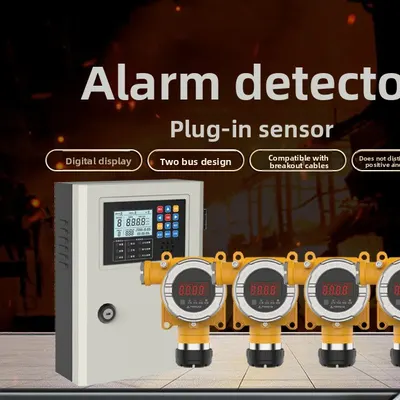
SaleIndustrial Gas Leak Detector with Explosion-Proof Design
Regular price From $28.68Regular priceSale priceFrom $28.68
No products match these filters. Remove all
Networking security gear at Global Swanky covers Wi-Fi routers, range extenders, network adapters and hubs, plus home safety essentials like video doorbells, motion sensors, smoke and carbon monoxide alarms. Prices start at $10.00, and US shipping is free.
Key Takeaways
- Our networking security collection lists 96 products, priced from $10.00 to $545.81 as of October 5, 2026.
- About a third are networking items: 12 routers and hotspots, 7 extenders, network adapters, hubs and cable tools.
- The rest cover home and personal safety: doorbells, motion and leak sensors, smoke, CO and gas alarms, fire blankets and personal alarms.
- The FTC advises encrypting home Wi-Fi with WPA3 or WPA2 Personal and changing your router's default admin password.
- CISA suggests a Wi-Fi passphrase of 5 to 7 unrelated words totaling at least 16 characters.
On this page
- What Is Networking Security?
- What's in Our Networking Security Collection?
- Routers and 4G Hotspots
- Wi-Fi Range Extenders
- Network Adapters, Hubs and Cable Tools
- How to Secure Your Home Wi-Fi Network
- Video Doorbells and Wireless Doorbells
- Home Security Sensors and Alarms
- Fire, Smoke and Gas Safety
- Personal Safety Devices
- How Much Does Networking Security Gear Cost?
- Common Mistakes With Networking Security
- Shipping, Returns and Support
- Why Shop Networking Security at Global Swanky?
- Networking Security FAQs
- Find the Right Networking Security Gear
What Is Networking Security?
Networking security is the practice of protecting a network, and the devices and data on it, from unauthorized access, misuse and damage. Wikipedia describes network security as an umbrella term covering the policies, tools and practices used to protect computer networks.
For businesses, networking security means firewalls, access controls and monitoring. At home, it means simpler but just as important steps: a properly configured router, strong Wi-Fi passwords, updated firmware and devices you trust.
This collection takes a practical, home-first view. It pairs the hardware that runs your home network with devices that protect your household, from doorbells and motion sensors to smoke and gas alarms.
What's in Our Networking Security Collection?
The collection lists 96 products, and 95 were in stock when we updated this page on October 5, 2026. Prices run from $10.00 to $545.81, with a median starting price of $22.91.
Here's how the range breaks down.
| Group | About how many | Examples | Starting prices (USD) |
|---|---|---|---|
| Routers and 4G hotspots | 12 | Dual-band routers, 4G LTE routers, a car router | $18.00 to $73.00 |
| Wi-Fi extenders | 7 | 300Mbps and 2.4GHz repeaters with Ethernet ports | $11.89 to $60.60 |
| Network adapters, hubs and cable tools | 14 | USB Wi-Fi cards, Type-C docks, Cat6 splitter, crimping kit | $10.41 to $53.00 |
| Doorbells | 9 | Video doorbells, wireless chimes | $11.02 to $79.00 |
| Home security sensors and alarms | 14 | ZigBee motion and leak sensors, door alarms, alarm system | $11.00 to $92.46 |
| Fire, smoke and gas safety | 17 | Smoke, CO and gas alarms, fire blankets, escape mask | $11.05 to $51.17 |
| Personal safety | 10 | Personal alarms, Bluetooth trackers | $12.99 to $28.05 |
| Car escape tools and respirators | 8 | Window breakers, seat belt cutters, respirators | $10.00 to $22.91 |
Groups come from product titles on October 5, 2026, and counts are approximate where items overlap. The industrial gas leak detector has the widest price range, from $28.68 to $545.81 depending on the version.
Routers and 4G Hotspots
The router is the heart of networking security at home. It connects your devices to the internet and controls who can join your network.
Home Wi-Fi routers
Our home routers cover basic and dual-band networking security setups. The Home 300Mbps Wireless Router with Strong Through-Wall Signals costs $19.99, the Dual-Band 1200Mbps Wireless Relay Router costs $22.24, and the Wireless Router with 1000Mbps Speed and VPN Support costs $31.08.
For more control, the High-Speed Wired Router with Dual-Band WiFi and Firewall costs $73.00, the most expensive router in the range. Browse more models in our wireless routers collection.
4G LTE routers and hotspots
4G routers connect through a mobile SIM card instead of a cable line. They're useful for travel, cabins, backup internet and places without broadband.
The 4G LTE WiFi Router with SIM Card Slot and Dual External Antennas costs $36.08, the Portable WiFi Router with 4G Hotspot costs $42.00, and the Wireless Router with 4G LTE High Speed Portable WiFi Hotspot costs $52.51.
Car router
The Portable Car Wireless Router for Travel, Work and Daily Driving costs $29.99. It shares an internet connection with passengers' devices on the road.
Wi-Fi Range Extenders
Range extenders repeat your router's signal into rooms it can't reach, extending your networking security setup across the whole home. They're a simple fix for dead zones in bedrooms, garages and back gardens.
Our extenders include the WiFi Signal Booster Extender ($11.89), the WiFi Range Extender with Ethernet Port and Wireless Signal Booster ($12.90), the Gaming WiFi Range Extender with Ethernet Port ($13.67) and the 300Mbps WiFi Range Extender Repeater ($14.48).
Models with an Ethernet port can also connect a wired device, such as a smart TV or games console, near the extender.
Extender security tips
Every extender is another device on your networking security front line. Change its admin password during setup, keep its firmware updated, and use the same strong encryption as your main router.
Network Adapters, Hubs and Cable Tools
Adapters and hubs connect laptops and desktops to networks and screens, completing the wired side of networking security at home. Cable tools help you build and repair wired connections.
Wi-Fi network cards
The W97L 1200M USB Wireless Network Card for Laptops and Desktops costs $32.00, and the ALFA NIC USB Wireless Adapter 150Mbps costs $25.08. A USB adapter adds or upgrades Wi-Fi on a computer without opening the case.
Hubs and docking stations
Type-C hubs and docks add ports for Ethernet, HDMI, VGA and memory cards. Options include the 11-in-1 Type-C Expansion Hub ($39.99), the USB Type-C 11-in-1 Expansion Dock with Gigabit Connectivity ($40.57) and a USB Docking Station from $10.41.
A wired Ethernet connection through a hub can be faster and more stable than Wi-Fi for video calls and large downloads.
Cable tools
For DIY wiring, see our networking tools collection. The Network Toolkit Combination Set for LAN Crimping and Testing costs $27.97, the Multifunctional Network Cable Pliers cost $15.99, and the Cat6 Network Cable Splitter costs $12.99.
How to Secure Your Home Wi-Fi Network
Good hardware only protects you if it's set up well, and setup is where most networking security problems start. The FTC recommends encrypting your network by setting your router to WPA3 Personal or WPA2 Personal, and changing the router's default administrative username, password and network name (FTC, How To Secure Your Home Wi-Fi Network).
Follow these steps when you set up a new router:
- Log in to the router's admin settings using the details on its label or in the manual.
- Change the default admin username and password to something unique.
- Set the Wi-Fi encryption to WPA3 Personal, or WPA2 Personal if WPA3 isn't available.
- Rename the network, avoiding your name, address or other personal details.
- Create a strong Wi-Fi password, separate from the admin password.
- Check for firmware updates and turn on automatic updates if offered.
- Set up a guest network for visitors and smart devices.
Two passwords, two jobs
Your router has two passwords. The FTC explains that the Wi-Fi network password lets devices join your network, while the admin password controls the router's settings, so both need to be strong and unique.
Strong Wi-Fi passphrases
CISA suggests creating a memorable passphrase from 5 to 7 unrelated words, totaling at least 16 characters (CISA, Securing Your Home Wi-Fi). It also advises against using personal information in your network name.
Features to switch off
The FTC notes that convenience features like remote access and WPS can make a network less secure. Turn them off unless you really need them.
If your router has no WPA2 or WPA3 option at all, the FTC suggests considering a new router. Older routers that can't be updated are a weak point in networking security.
Video Doorbells and Wireless Doorbells
Doorbells are often the first line of home security. A video doorbell shows who's at the door, even when you're not home.
The Smart Video Doorbell Camera with WiFi and Two-Way Audio Intercom costs $79.00, while the Intelligent Video Doorbell with HD Capture and Two-Way Intercom costs $17.99 and the Low-Power Smart Visual Doorbell costs $13.99.
Simple wireless chimes, such as the Waterproof Wireless Doorbell with 1000ft Long Range Home Signal ($13.99), suit homes that just need a reliable bell.
Connecting smart doorbells safely
A Wi-Fi doorbell joins your home network, so it's part of your networking security. Connect it to a guest network where possible, change any default passwords, and keep its app and firmware updated.
Home Security Sensors and Alarms
Sensors watch over your home when you're not looking, and smart models connect to the same network your router protects, which ties home safety to networking security. Our range covers motion, water leaks, doors and windows.
Smart ZigBee and Wi-Fi sensors
ZigBee and Wi-Fi sensors send alerts to your phone. The ZigBee Motion Sensor with PIR Detection costs $30.98, the WiFi Zigbee Smart Motion Sensor with Mobile Alerts costs $25.92, and the ZigBee Water Leak Detection Sensor costs $32.06.
ZigBee sensors usually need a compatible hub or gateway, so check each listing for what's required.
Door, window and travel alarms
The Magnetic Door Window Alarm with Loud Sound costs $21.50, and the Door Stop Alarm with Loud 120dB Anti-Theft Alert costs $23.92 for homes, hotels and travel. The Portable Door Lock Brace for Home, Hotel and Apartment Security costs $19.00.
Complete alarm system
The Wireless WiFi Home Security Alarm System with No Monthly Fees costs $92.46, the most complete alarm in the range. Its title notes there are no monthly fees, which suits renters and budget-conscious homeowners.
Fire, Smoke and Gas Safety
Fire and gas alarms protect lives, so they belong in every home safety plan alongside your networking security gear. Our range includes smoke alarms, carbon monoxide alarms, combination detectors and gas leak alarms.
Smoke and carbon monoxide alarms
The Early Fire Detection Alarm SS-168 with Sound and Light Alert costs $13.00, and the Carbon Monoxide Alarm with Audible and Visual Alerts costs $36.56. The 4-in-1 Gas Carbon Monoxide Smoke Detector with Wireless Alerts costs $36.44.
Test alarms regularly with the test button, replace batteries as the manual directs, and follow the manufacturer's guidance on where to mount each type.
Gas leak detectors
The Domestic Gas Leak Alarm for Home Safety costs $11.40. For workshops and commercial spaces, the Industrial Gas Leak Detector with Explosion-Proof Design runs from $28.68 to $545.81, with versions for combustible gas and methane.
Fire blankets and escape gear
Fiberglass fire blankets smother small fires, such as a pan fire in the kitchen. Our blankets start at $18.34, and the TZL30 Fire Escape Smoke Mask costs $29.43.
Personal Safety Devices
Personal safety devices protect you away from home, rounding out the networking security collection. Personal alarms make a loud sound to draw attention, while Bluetooth trackers help you find lost keys and bags.
The Personal Safety Alarm with 130dB Loud Emergency Alert and LED Light costs $24.45, and rechargeable alarms with strobe lights start at $27.14. The Mini Bluetooth Anti-Lost Tracker for Keys, Bags and Luggage costs $23.47.
Car escape tools
Window breakers and seat belt cutters are small tools for vehicle emergencies. The 4-in-1 Emergency Car Hammer with Cutter, Breaker and LED Light costs $10.00, the cheapest item in the collection.
Keep a car escape tool within the driver's reach, not in the trunk or glove box.
How Much Does Networking Security Gear Cost?
Most networking security gear in this collection costs under $50. Of 96 products, 57 start under $25, 31 start between $25 and $50, 8 start between $50 and $100, and none start above $100.
Here's what each band buys:
- Under $25: Wi-Fi extenders, basic routers, wireless doorbells, smoke and gas alarms, personal alarms and car escape tools.
- $25 to $50: dual-band and 4G routers, network adapters, hubs, smart sensors and CO alarms.
- $50 to $100: the firewall router, the 4G LTE hotspot, the smart video doorbell and the Wi-Fi alarm system.
Standard US shipping is free, so the price you see is what you pay for delivery.
Common Mistakes With Networking Security
Most problems come down to a few avoidable slips:
- Keeping default passwords. Change both the router admin and Wi-Fi passwords.
- Skipping firmware updates. Updates fix security weaknesses.
- Leaving WPS and remote access on. Turn them off unless you need them.
- Putting smart devices on the main network. Use a guest network for doorbells and sensors.
- Using an old router with no WPA2 or WPA3. Replace it.
- Forgetting to test alarms. Test smoke and CO alarms regularly.
Shipping, Returns and Support
We ship networking security products to US addresses only, and standard shipping is free on every order. Most items ship from our suppliers' warehouses overseas, mainly in China.
How long does delivery take?
Most orders arrive within 6 to 32 business days. That's 1 to 2 business days of handling plus 5 to 30 business days in transit. You can track your order once it ships.
Can you return networking and security products?
Yes, within 30 days of delivery, if the item is new, unused and in its original packaging. There's no restocking fee, and refunds go back to your original payment method within 10 days of us receiving the return. Read the full terms in our return policy.
Why Shop Networking Security at Global Swanky?
Range and price are the honest reasons. You can upgrade your home network and your home safety from one collection, mostly under $50, with free US shipping.
Global Swanky LLC is a Wyoming company that works with third-party suppliers, so delivery is slower than a local store and product details come from our suppliers. If compatibility isn't clear, contact our support team before you order.
For cameras, browse our security cameras collection and our smart home devices collection, and read our guide to the best home security cameras and our mini security camera guide.
Networking Security FAQs
What is networking security?
Networking security is the practice of protecting a network, its devices and its data from unauthorized access and misuse. At home, that means a well-configured router, strong passwords, encryption and updated firmware. Our collection pairs networking gear with home safety devices from $10.00.
How do I secure my home Wi-Fi network?
Set your router to WPA3 Personal or WPA2 Personal, change the default admin username and password, rename the network and use a strong Wi-Fi password. The FTC also advises turning off features like remote access and WPS unless you need them.
What makes a strong Wi-Fi password?
CISA suggests a memorable passphrase of 5 to 7 unrelated words totaling at least 16 characters. Keep it different from your router's admin password, avoid personal information, and don't share it widely. A guest network gives visitors access without your main password.
Should I replace an old router?
If your router doesn't offer WPA2 or WPA3 encryption, the FTC suggests considering a new one. Routers that no longer get firmware updates are also a weak point. Our dual-band routers start at $22.24, and our router with VPN support costs $31.08.
What does a Wi-Fi range extender do?
A range extender repeats your router's signal into areas it can't reach, such as upstairs rooms or a garage. Our extenders start at $11.89, and several include an Ethernet port for wired devices. Change each extender's default password during setup.
What is a 4G LTE router?
A 4G LTE router connects to the internet through a mobile SIM card instead of a cable line, then shares that connection over Wi-Fi. It suits travel, cabins and backup internet. Our 4G routers and hotspots start at $36.08.
Do smart doorbells affect my network security?
Yes, because a Wi-Fi doorbell is another device on your network, and weak settings on any device can affect your wider networking security. Put it on a guest network where possible, change default passwords and keep its firmware updated. Our video doorbells range from $13.99 to $79.00.
Do ZigBee sensors need a hub?
Usually yes: ZigBee sensors communicate with a compatible hub or gateway, which then connects to Wi-Fi and your phone. Check each listing for hub requirements before you buy. Our ZigBee motion and water leak sensors start at $14.00.
How long does shipping take?
Most orders arrive within 6 to 32 business days of being placed. That covers 1 to 2 business days of handling and 5 to 30 business days in transit. Standard shipping is free on every order, and we currently ship to US addresses only.
Can I return a router or alarm?
Yes, within 30 days of delivery, as long as it's new, unused and in its original packaging. Email support@globalswanky.com with your order number, the product name and the reason, then wait for return instructions. There's no restocking fee on any return.
Find the Right Networking Security Gear
Strong networking security comes down to three checks: reliable hardware, careful setup with strong passwords and encryption, and safety devices that protect your household. Get those right and both your network and your home are safer.
Ready to upgrade? Scroll up to the product grid, filter by price, and pick the networking security gear that fits your home.
- Choosing a selection results in a full page refresh.
- Opens in a new window.

Global Swanky
1 × $0.00 · Free US shipping
$0.00
- 1 Payment
- 2 Shipping
- 3 Done
Checkout is temporarily unavailable.
Please try again in a moment, or email support@globalswanky.com and we will help you order.
Secured by Stripe. Card details go straight to Stripe, never to our servers.
Order confirmed
Thank you. A confirmation is on its way to .
- Order number
- Total paid
- Paid with
- Delivery
- Dispatched within 24 hours, 3–7 business days